

Redirect Examples Using .htaccess
 Reading Time: 3 minutes
 TL;DR Summary: Force the WWW or non-WWW version of a domain, enforce HTTPS, manage SSL certificates, and handle domain redirects effectively using .htaccess. Improve SEO, security, and user experience with these concise code snippets. Enhance your website's performance and functionality effortlessly. Explore more resources for advanced .htaccess usage below. Read on for detailed .htaccess examples and tips to optimize your website's performance and security.
I’m happy to say that after a lot of research, trial and error, and pulling out of my hair, I found some good mod_rewrite (.htaccess) examples that work well. I created this page so I can refer to them when I need them, so I’m using them myself and this page is updated from time to time.
My .htaccess Hacks:
- How to Redirect One Domain Name to Another Domain Using .htaccess
- How to Force the WWW Version of a Domain Name
- How to Force the non-WWW Version of a Domain Name
- Make a Website Only Accessible to You, Redirect Everyone Else
- How to Force HTTPS Using .htaccess
- How to Force HTTPS for WordPress Multi-Site – Per Domain
- Prevent Image Linking Using .htaccess
- Don’t Show “index.php” in the URL (WordPress)
- How to Redirect 404 Pages to the Home Page
- How to Redirect Off-Site Image References to a Different Image
What I Use Most Often:
This .htaccess code forces HTTPS (SSL) and forces the non-www version of the domain/website.
# Force HTTPS
RewriteEngine On
RewriteCond %{HTTPS} !=on
RewriteRule ^/?(.*) https://%{SERVER_NAME}/$1 [R=301,L]

# Force the non-www version of the website
RewriteCond %{HTTPS} on
RewriteCond %{HTTP_HOST} ^www\.(.*)$ [NC]
RewriteRule ^(.*)$ https://%1/$1 [R=301,L]
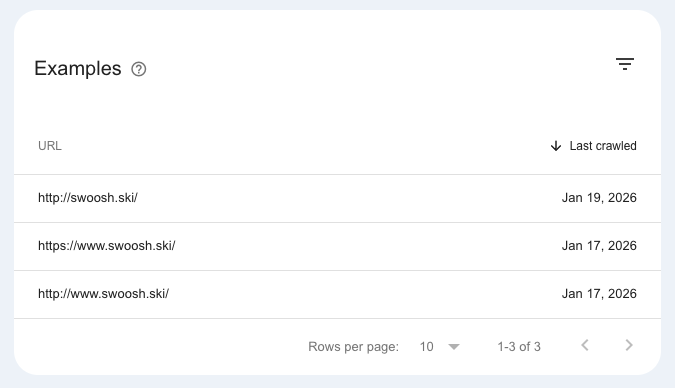
Doing this helps ensure search engines like Google just see one version of your home page / website and not 3.
For example, before I had this code in place, Google was showing this website had 3 pages, not just one in Google Search Console:
Prerequisites / Important Notes:
- Your Apache server needs mod_rewrite enabled – most of them do. Check with your host or server admin.
- My examples here are in .htaccess files. What’s in the type code below is all you need in that file – unless you already have something in that file, then you might want to keep that stuff there – up to you.
- Since https is the preferred method now (SSL), all of these examples use that protocol (versus just http).
- I got these examples from the sources mentioned below and some I’ve created or modified.
- Of course, replace things like “yourdomain.com”, “yourolddomain.com”, and “yournewdomain.com” with your actual domain name.
- I like to make it a habit of going to a website in my browser and then I copy the full URL or domain from there instead of just typing it in. I do this to make sure the URLs I use are accurate because typos can be a pain in the butt to debug. Just take that out of the equation and copy and paste as much as possible when doing this.
More Resources:
And there’s even more here (some of my sources and good resources for htaccess stuff):
- htaccess Cheat Sheet
- Stupid htaccess tricks (VERY good resource)
- .htaccess Tutorials, htaccess Examples, Sample .htaccess Files
- Redirecting WordPress index.php to root
- WordPress Htaccess Tips And Tricks (elegantthemes.com)
- RewriteRule Flags
- My .htpasswd Generator Tool
If you like the copy buttons on this page, check out my WordPress Code Copy Button Plugin.
📄 Download a PDF of This Article






Great to see you’re cleaning up the Rewrite Rules. I have a bunch of reeirdcts on my site (having moved or removed various things), but WordPress keeps eating the things I add to the .htaccess. One possibility is to deny it access through CHMOD, and just update it myself, but this is work I’d really rather avoid.The question: does WordPress simply generate a new .htaccess when it changes a rule, and copy it over the old one? Is there some way to add stuff to the .htaccess file that WordPress won’t remove? One possibility, I suppose, would be to have a custom .htaccess rules section on the Dashboard; are there any plugins to help with this?
I believe WordPress appends onto .htaccess files and doesn’t write them from scratch – unless it doesn’t exist… in that case, it would create one.
I had an interesting thing happen today. We have a client that pointed their domain to our server and the IP address would come up instead of the domain name.
I checked all the server settings on our side and everything looked fine. I thought it was the .htaccess file but that wasn’t it. I then did a “wget” command on my Mac (in Terminal) and saw that our client redirected the domain name to the IP address. So they did a forward to an IP instead of changing the IP address in their DNS. Problem solved but it had me wondering what was going on for a few minutes.