Day 10 – More Writing Tips
 More Writing Help for You
So, like I said, the main thing is content. You want to provide lots of great, original content that people will want to bookmark, share and tell others about. It need to blow them away. When you do that, you create trust. They trust you and want more from you.
One of your goals is to build an email list and we went over that. If you need a refresher, here’s that article:
How to Set Up an Email List (tonyherman.com)
That way, you are gathering your own audience that wants to hear from you over and over again. The money is in the list. I’m going to cover this in more depth in a few days, so put a pin in that for now.
Since great content drives that list, here are some more tips on writing that will help you.
Curating Content
A good way to start off if you’re new to writing is content curation. It means you bring in parts from other articles and create something new out of it. Now, you don’t want to just copy and paste articles together – I’m not talking about that. It’s done with more care.
When you curate content, you still want your article to be at least 60% your own content. The main purpose, I think, in curation is to help the reader. Bring in sections of other articles to help make your point.
Here are the steps I use when curating content:
- Copy the headline and domain name from the source.
- Link the headline back to the original article.
- Indent or quote the text that is coming from the other article.
When you indent or quote the text, you’re clearly showing what is from the other article – where it begins and ends.
Here’s an example from an article I wrote about writing great articles (of course):
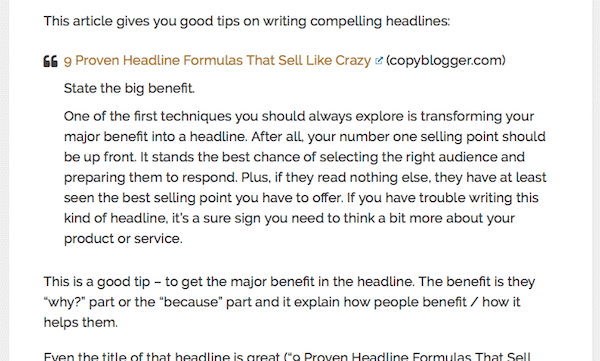
You can see that I’m quoting it because it’s indented. The theme I’m using puts a quotation mark where the quote starts and then indents the text that I selected. This works good on most themes because the content has “blockquote” tags around it and search engines will know what you’re doing. You use this button:
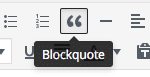
If your theme doesn’t do this well, then either get a better theme or use the indent button.
Often, when you show some content, people will see that it’s good content, go to that article and them come back to your website. Make sure you set it up so that links to other websites open in a new tab/window:
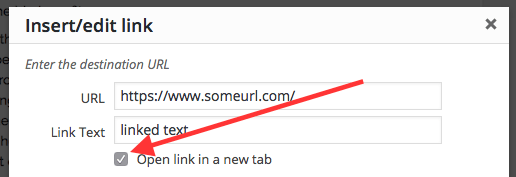
Speaking of external links, you may notice the symbol some websites use (like mine) that indicates to people that the link will open in a new window:

I’ve added that to this website and it’s a free plugin you can use. You don’t have to put that symbol in, you just have the link open in a new tab/window and the plugin inserts that symbol (on the front side) for you. There’s one called Easy External Links you should check out.
Use Good Images
When you create article, make sure you’re using good images in them. You want a featured image and then images inside the article.
This does a few things. First, it makes the article more scannable. If someone scans the article and sees an image that relates to what they’re looking for, they’ll stay and read the article. It helps ensure they don’t “bounce” off of (leave) your website. Second, it breaks up the text. A page that’s all text looks daunting to read, so adding in images helps make it look easier to read.
And then make sure you use images you have permission to use. This is really important or you might get sued. I’ve seen this happen to a few clients of mine. They get hit up with threats of lawsuits from $1000 to $5000 or more for using an image they don’t have permission to use. When that happens, not only might you have to pay that but it distracts you from writing content.
I have a list of sources where you can either buy images to use or get free images:
Stock Photography Resources (Lots of Free Ones) (tonyherman.com)
Bookmark that page and use the resources there.
Conclusion
I didn’t want to make this article too long but I gave you some advice on curating content and using images for your articles.
Again, provide the best content you can. My “go deeper” tip is one I use a lot – I’ll re-read an article and add some more to it and this usually gets me another 10% or more words in the article and it makes my articles better. Go back and read the lesson on writing to refresh yourself on all that we covered there:
Day 5 – Writing Content So Search Engines Love You (tonyherman.com)
And happy writing!