

Web Designers: Want to Boost Client Value and Your Own Revenue?
 Reading Time: 4 minutes
 Web designers are always looking for ways to add value for their clients—without piling on extra complexity. Here’s a win-win idea that takes just a few minutes and instantly makes you look like a local SEO expert: add a custom service area map to your client’s website.
And yes, you can (and should) charge for it.
Why Bother with a Service Area Map?
Most local businesses aren’t locked to one location. They serve nearby towns, suburbs, or rural areas. But when someone lands on their website, they often have no idea where that business is willing to travel. A simple service area map fixes that.
It’s one of those little things that quietly does a lot:
- Clarifies geography – Customers instantly know if they’re in the coverage area.
- Boosts local SEO – Google gets a better sense of the business’s regional reach.
- Adds professionalism – A map looks better than a wall of city names.
- Reduces support questions – Fewer “Do you come to [town]?” emails and calls.
This Used to Be a Chore
If you’ve ever tried to add a service area map in the past, you probably remember the pain: Google Maps API keys, billing accounts, complex setup, messy embed code, or map generators that looked like they came from 2006.
Half the time, it wasn’t worth the trouble. That’s why a lot of designers skipped it—or wasted hours wrestling with plugin settings.
But now there’s a better way.
Put a Map on the Bottom of Every Page
We’ve seen one customer use it on the bottom of every page (Metro Plumbing, Inc.), which works great – right above the footer:
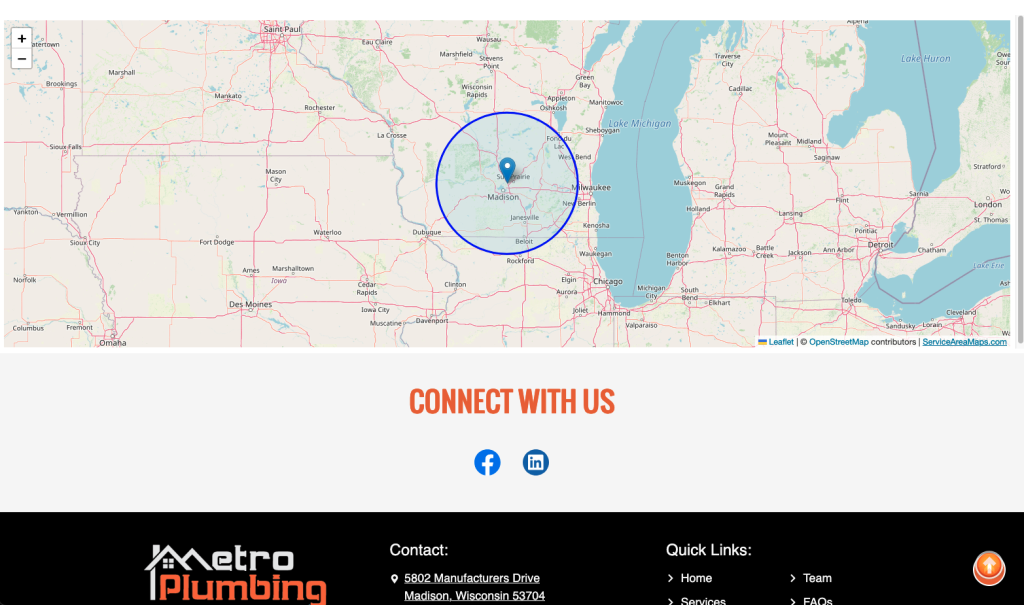
This is great for service companies like plumbers, HVAC, electrical, appliance dealers, or even restaurants with delivery areas. Just choose the “Display at Full Width” checkbox to get the embed code for a map that goes the entire width of a page or section.
How to Add a Map in Under 5 Minutes
Use ServiceAreaMaps.com to create a clean, radius-based map:
- Enter your client’s address
- Pick a radius (e.g., 25 or 50 miles)
- Copy the embed code and paste it into their site
That’s it. No API keys. No login required. No bloat. Just a nice-looking map that works anywhere you can paste HTML—including WordPress, Squarespace, Webflow, or plain HTML sites.
Charge for It—You’re Adding Value
This isn’t just a technical task. You’re giving your client something that improves their site and helps them get more business. Don’t treat it like a throwaway favor.
Here are a few simple ways to price it:
- One-time add-on: $50–$150 depending on scope
- Part of a local SEO upgrade – combine it with location pages
- Bundle it in a “Service Area Boost” offer with other regional enhancements
It’s fast work for you, but worth real dollars to them. Especially when you show how it helps clarify their service area and improve rankings.
If You’re a Freelancer, This is an Easy Win
Freelancers—this one’s for you. Clients love deliverables they can see and understand. A map is visual, helpful, and feels like something “big” even though it only takes a few minutes to do. That’s the kind of work you want more of.
It’s also a great upsell after launch. Pitch it in a follow-up email a month after the site goes live, or build it into a “local SEO refresh” package you can offer current and past clients.
If you charge $75 to paste in a map you built in 3 minutes, nobody’s mad—and you just made an extra hundred bucks. Multiply that by a few clients a month and you’ve got a nice recurring upsell with almost zero effort.
It’s a Win-Win for Everyone (Really)
- Your client gets a better-performing website
- They get a free business page (citation) on the website
- Their customers get clear, helpful info
- You get paid for work that only takes a few minutes
That’s rare in this business. So if you’re designing sites for local service providers, start offering service area maps today. It makes you look smart, it helps your clients win, and it quietly adds revenue to your projects.
👉 Try it now at ServiceAreaMaps.com
📄 Download a PDF of This Article


