Using Radius Maps for Emergency Containment and Response
 Reading Time: 3 minutes
 In emergency situations, every second counts. Whether it’s a chemical spill, an infectious disease outbreak, or a natural disaster, knowing exactly who is affected—and how far the danger reaches—can save lives. That’s where ServiceAreaMaps.com comes in.
Why Use Radius Maps in Emergencies?
Radius maps give you an instant visual of how far a situation could extend. Just enter an address and draw a containment zone with a specific radius. It’s fast, easy, and accessible to anyone with a web browser—no technical training required.
Real-World Use Cases

1. Containment Zones
During outbreaks or hazardous material spills, quickly map off a 1-mile, 3-mile, or 10-mile zone to inform the public, guide response efforts, and reduce spread or exposure. Post the map publicly or send it to emergency contacts.
2. Evacuation Planning
Visualize evacuation areas around fires, floods, or industrial accidents. Emergency coordinators can use these maps to direct people out of harm’s way and into safe zones.
3. Public Alert Boundaries
Use a radius to define where alerts apply—such as boil water advisories, power outages, or severe weather warnings. Share the link so residents can see if they’re affected.
4. First Responder Coordination
Plot coverage zones for EMS, police, or fire teams. Use maps to identify overlap, handoff areas, or underserved sectors within a defined distance from the incident site.
5. Search and Rescue Radius
Draw a containment area from the last known location of a missing person. Search teams can divide the area into sectors and document coverage.
6. Temporary Shelter Zones
Provide displaced individuals with directions to nearby shelters, food banks, or medical centers by creating a radius around their location to show all resources within range.
7. Command Center Zones
Map a radius around field command posts or relief stations. Useful for logistics, volunteer coordination, and access control.
8. Drone Flight Boundaries
Define authorized flight areas around incidents for drones used in mapping, surveillance, or environmental assessment.
9. Riot Areas or Places People Should Not Go
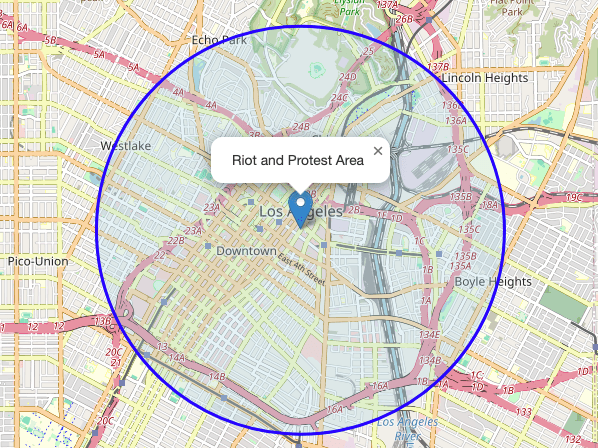
If a riot or protest breaks out and you need to show people on a website which areas to avoid, then just create a map for each area and embed each map on your website.
10. News Articles or TV Stations – Coverage Areas
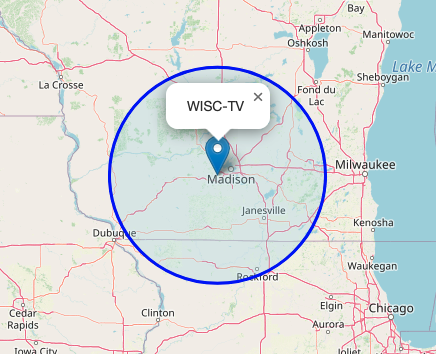
If you need a map for a news article on your website or TV channel, you can use this website. And if you need a radius to show a broadcast area, that works, too.
Easy to Use. Free to Share.
There are no logins, apps, or installations required. Create a map in seconds and share the custom link or embed it in your site. You can even download a standalone HTML version of your map for local backup.
Start Creating Emergency Radius Maps Now

Visit ServiceAreaMaps.com to draw your first containment or evacuation zone. Whether you’re a public official, first responder, or community volunteer, this tool gives you a simple way to turn location data into action.
Final Thoughts
In times of uncertainty, clarity matters. Radius maps provide fast, visual clarity when emergencies happen. Save the link, share it with your team, and use it to protect and inform the people who count on you.
The maps on this page are not interactive, but the maps you get at Service Area Maps are. You can zoom in and out, etc.
📄 Download a PDF of This Article