How to Share Two-Factor With Another Person (Without the Hassle)
 Reading Time: 3 minutes
 The First Problem With 2FA Codes Sharing
Two-factor authentication (2FA) provides a high level of security, but once you have to deal with sharing access, 2FA brings immense friction for your everyday use. If you are working with a virtual assistant, helping a family member, or managing the 2FA tokens for a team—rachid 2FA codes can get extremely angering fast.
Text messages show tardiness. Screenshotting is quite insecure. Coordinating via mail or chat often turns into a perplexing game of “Did you get it yet? or Did you get it?”
Is It Possible to Share Two-Factor Authentication Codes?
Sure, but how you go about it does matter. Most 2FA methods are actually designed to push a temporary code to the device or the phone number already trusted. Works well if you are alone in the world of logging in; now if someone else needs to finish the login race, this is where the bumps in the road start.
The crazy things one could be tempted to do:
- Forward the SMS
- Shoot a screenshot of it
- Just read the code to the other guy over the phone
- Share their whole device using screen sharing
All of these are in a certain way gliding through the cracks… sort of. But they are not efficient, and not secure. If these codes are time-sensitive, then get one that is built for this job.
Sharing 2FA Codes With Someone
The easiest way to share a 2FA code with another person is to use a temporary, real-time tool like ShareLogin.codes.
Here’s how it works:
- One person creates a room and sets a meeting time.
- They send the private link to the other person.
- When both people are on the page, one pastes the 2FA code.
- The other copies it immediately.
No accounts. No installations. No lingering data.
It works in any browser — desktop or mobile — and is especially handy when you’re trying to figure out how to share two-factor with another person on iPhone. Just open Safari, paste the link, and go.
Why ShareLogin.codes Works So Well
- Real-time sync — See the code appear instantly
- Presence tracking — Know when both people are “there”
- Temporary rooms — Nothing sticks around
- No signups — Just share a link
- Mobile-friendly — Works great on iPhone and Android
It’s perfect for:
- Remote teams
- Freelancers and clients
- Friends or family members managing shared accounts
- Anyone tired of jumping through hoops to send a six-digit number
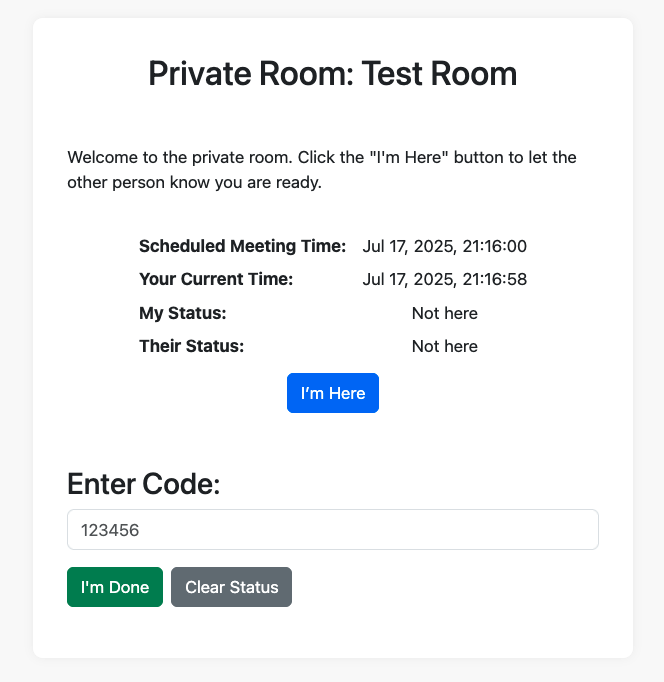
Once you create the private room, you get an interface to share the code. You’ll first click that you’re there, then either share or receive the code when the other person arrives. They see you typing in real time – or you see them. You can then say when you’re done entering letters or numbers.
Here’s how it looks (this isn’t functional – just a screen shot):
Does Meet4.codes Store Any of Your Info?
Nope. Nothing sticks around.
Meet4.codes is built to be temporary by design. When you share a 2FA code in a room, that info only lives in memory for as long as the session is active. Once someone clears the status or the session times out, the data is gone — no database logging, no tracking, no history.
- No accounts
- No logins
- No long-term storage
It’s like handing someone a sticky note and immediately tossing it in the shredder after they read it. Simple, fast, and private — just how code sharing should be.
Final Tip: Never Reuse 2FA Codes
2FA codes expire quickly — usually in under 60 seconds. That’s why having a fast way to deliver them matters. Don’t try to save or reuse codes, and avoid pasting them into shared documents or unsecured chat threads.
If you find yourself sharing 2FA often, set up a process with ShareLogin.codes so it becomes part of your workflow.
Bottom Line
If you’ve been wondering how to share two-factor authentication with another person without headaches, this is your answer. Tools like ShareLogin.codes exist because the current system wasn’t designed for collaboration — but that doesn’t mean you have to suffer through it.
Try it once and you’ll never go back to texting screenshots.
📄 Download a PDF of This Article