

How to Find Out Where a Website Is Hosted
 Reading Time: 3 minutes
 Who Hosts That?
Ever wondered where a website is actually hosted? Whether you’re doing competitor research, trying to solve a performance issue, or just curious, knowing the web host behind a site can be very useful.
Why Would You Want to Know?
- Performance Troubleshooting: Slow website? You might want to check the host before moving providers.
- Competitive Research: Curious what provider your competitor is using?
- Site Ownership Questions: If you’re buying or inheriting a domain, this is part of the due diligence.
Quick & Easy: Use WhoHostsMyWebsite.com
The fastest way to find out where any website is hosted is to use WhoHostsMyWebsite.com. Just type in a domain name, and the tool gives you a simple answer. No tech skills required.

Behind the scenes, it performs DNS lookups and traces IP addresses to identify the hosting provider. It’s lightweight, accurate, and totally free to use.
Other Ways to Identify a Website Host
1. Use a WHOIS Lookup Tool
A WHOIS lookup can sometimes tell you the registrar and nameservers being used, which can hint at the host. However, many modern services use cloud-based DNS or privacy protection, so this method is hit or miss.
2. Check the IP Address
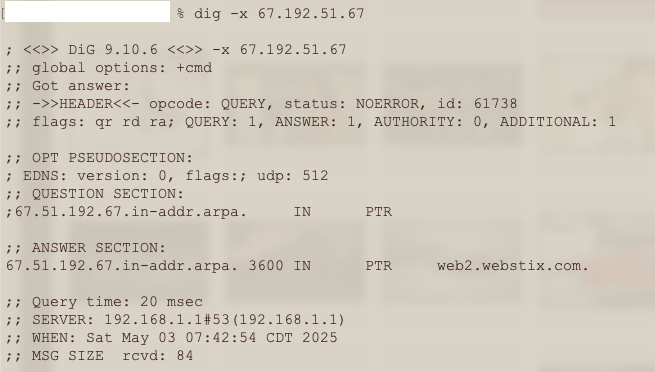
You can do a DNS lookup using tools like ping, nslookup, or dig from your terminal.
- If you’re on a Mac or Linux machine, try:
dig yourdomain.com - Once you have the IP address, run:
dig -x [IP Address]to see the reverse DNS and what it may reveal about the host.

This often shows clues like the hosting provider’s name or server range identifier (like “aws.amazon.com” or “bluehost.com”).
3. Inspect HTTP Headers
Some web servers include clues in their response headers. Tools like WebConfs can show these. Look for a “Server” or “X-Powered-By” line—these can sometimes give away hosting platforms like Cloudflare, WP Engine, or Shopify.
4. Check the DNS Records
If a site is using third-party DNS services (like Cloudflare or Amazon Route 53), it might be masked. But DNS tools can still show you what CDN or routing layer the site is using.
Keep in Mind
Not all hosting data is easy to trace. Many sites use CDNs, proxies, or custom setups that mask their true origin. But using a combo of tools—especially something like WhoHostsMyWebsite.com—you’ll usually get the answer quickly.
Final Thoughts
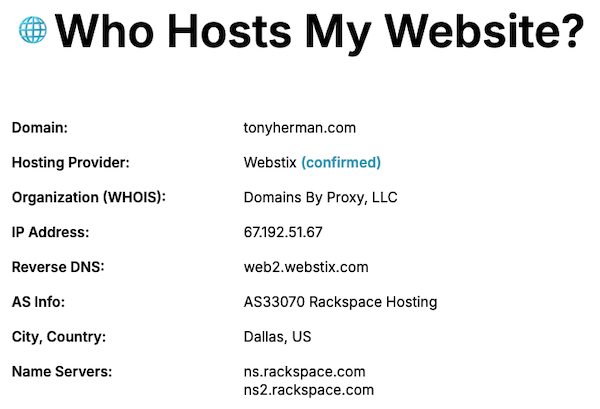
If you’re trying to figure out where a website is hosted, you don’t need to dig through code or perform digital forensics. Tools like WhoHostsMyWebsite.com make it fast, free, and simple. Give it a try and satisfy your curiosity—or get the info you need to make a smarter hosting decision.
📄 Download a PDF of This Article


