Day 7 – Promoting Your Content for Additional Traffic
 It’s Time to Get Traffic!
Now that you have your website up and running with some articles, it’s time to plan on how you’re going to get traffic to your website.
You’ll first want to get at least 5 great posts/articles on your website before you start promoting it. The reason is, if you start promoting it and people come and don’t find much there, they’ll probably leave and never come back. When they get to your website, they need to be at least mildly impressed with it – if not wildly impressed.
You’ll also want to do some testing. Ask friends to view it on their computers and devices (phones, tablets). Make sure it looks great. If not, get those things fixed. Often, the theme developer/publisher can help you.
Ways to Get Traffic to Your Website
1. Use Social Sharing Buttons
Ask people to share your content and have buttons on your website so that it’s easy for them to do it.
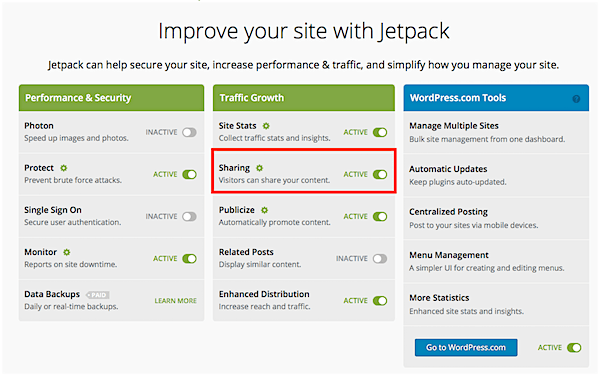
I really like the buttons that come with the JetPack plugin. Go to the Jetpack settings:
Jetpack > Jetpack
and make sure it’s turned on (active):
Then go to:
Settings > Sharing
On this page, you can connect your social accounts to your website so when you publish a new post, it goes out on your social networks (pretty cool, eh?):

And then you can set up your sharing icons below that section:
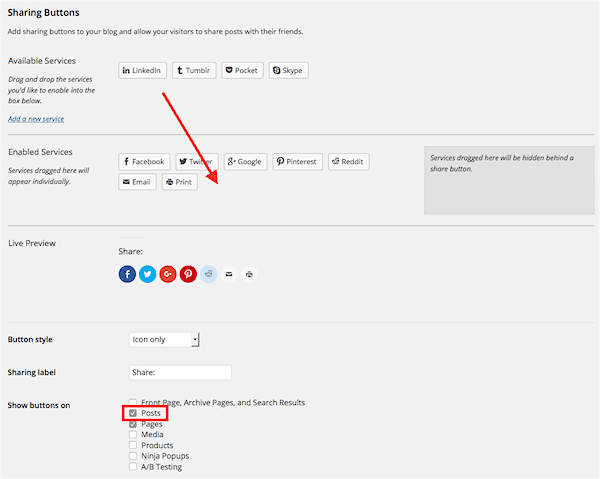
Drag them down and it shows you a preview. Make sure the checkbox next to Posts is checked and then save the options at the bottom.
2. Work Twitter, Facebook or Instagram
I suggest choosing one social network and working it well – versus trying to work too many. It’s up to you which one to start with and it’ll partly depend on which niche you’re in and where your audience is. Some networks like Tumblr are a little easier to maintain and can easily be done at the same time.
A good tool to manage your social media is HootSuite. I haven’t used it much but I know it’s powerful. If you’re on Twitter, you can use TweetDeck for free and, with it, you can schedule your Tweets.
Remember that social networks are… social. That means you shouldn’t promote yourself all the time but rather go and interact. I see people doing this wrong all the time. They just toss all their marketing out there like a robot and it’s like getting hit in the face with ads. You can do this well if you’re providing great content but remember to put in some non-promoting messages pretty often.
You can take a picture on your way to work or of an event you went to. Say how your day is going and what you’re excited about. Ask people questions. There are lots of great ways to look like a real human being on social networks.
How Facebook Works
With Facebook, how it works is, you see more posts from people you interact with. Think about it… if you saw every post from your hundreds of friends, it would be too much, right? Instead, you’re seeing posts from people you interact with most.
So… in order to get people to see your posts more often, have them interact with you. You can do this by asking questions, posting something funny or interesting or controversial even (if you want to go that route). You want people to comment or share what you posted.
Then, right after that, you can send out something to get their attention – a call to action. Ask them to follow you on Twitter, subscribe to your newsletter or even buy something.
When you use this formula on Facebook, you’ll get more people seeing your posts, which means more traffic to your website and more revenue!
3. Set Up “Web 2.0” Accounts
You’ll need links to your website to help get it to rank high. You don’t want to link-build too fast on a website that’s brand new – it’s best to wait 90 days. After that, start building links slowly.
When you build links (and what I means is get other websites to link to your site), you want to do it the safe way. Here are some tips on doing that:
- The link text should mainly be your website name or domain name – for example:
- TonyHerman.com
- www.TonyHerman.com
- https://www.tonyherman.com/
- Tony Herman
- Other generic link text is fine:
- Click here
- Read more
- Read my article
- You can also link to the article title. You’ve seen me do that a number of times during this course so far.
- Once in a while, link to your site or an article using a keyword but don’t do it very often.
Next, there are some “Web 2.0” types of links you can use. They are safe links you can get pretty easily. They are from sites like:
From accounts like these, you can set up a link to your website or bookmark your website and they are good links to have because they pass on ranking power… which we call “link juice” sometimes.
Make sure your social accounts are listed on your website.
Post regularly but make it like a conversation. Let your cover image do the sales for you.
4. Join Forums
There should be some online forums about your niche. Just search for your niche keyword and “forum” and see what comes up. Sign up at a few and take a look around. See what people are talking about.
The best way to use forums is to go into your settings and set up a signature that is a link to your website. If possible, link some text to your website and use a compelling question or statement. So if your website is about photography, you might set up your signature to be something like this:
Learn the Little Known Secrets to Taking Photos Like the Pros with a FREE Guide
And then that would link to your website where you’re giving away that PDF for signing up to your list.
What you want to do is look at the topics that are there and give helpful advice. Do research if you have to. Don’t spam the forums. You don’t want to dominate them but be a helpful resource for everyone.
What’ll happen is, your signature will remain with every post you reply to or start. People will be coming to that post for years to come to get the answer to that topic and they’ll see your link. This is a GREAT way to keep getting traffic to your website for months and years to come.
5. Post Answers on Yahoo! Answers
Yahoo! Answers is just like a forum. What I like to do is give advice and then refer people to an article on one of my websites that has to do with that topic – an article that will help them.
6. Comment on Other Blogs
You can use the same strategy with posting comments on related blogs. Give your opinion, ask questions and link your name to your website. With most blogs, you’re also to post a comment using your name, your email account and a link to your website. That’s how you get a link to your site.
Again, post great comments on blogs that help the blog owner. Research the answers if you have to – make that content good and people will want to find out where they can get more.
7. Guest Post on Other Blogs
Guest posting can help you get lots of traffic to your website but it takes a little work. You’ll need to get to know the owner of the website in some cases. Or you may need to apply to do it. They’ll want to see your website and your writing style. And there are some blogs that accept guest blog posts regularly.
Here’s a good article on how to guest post:
7 Awesome Reasons Why You Should Guest Blog (and How To Do It Right) (twelveskip.com)
You’ll also want to work on a good bio for yourself on your own website. Explain where you’re from, what you’ve done, awards you’ve received and so on. Pump yourself up a bit – in a humble way. Show what you’ve accomplished – and if you haven’t accomplished anything, then get out there and do something! 🙂
8. Find Broken Links on Other Sites
You can find missing content on website using archive.org, re-write it and then send an email or message to every site that was linking to that article. List the page that has the link and give them a link to your replacement article.
Easy!
9. Set up an RSS Feed Newsletter on GetResponse
I do this. It’s pretty easy.
Your WordPress website has something called an RSS feed. It’s kind of like a news feed but just from your website. Here’s mine:
https://www.tonyherman.com/feed/
Yeah, not too exciting, right? Well, that’s because it’s basically the raw text without much else but when it’s this way, other websites can use it and put it in their own format. They can syndicate your content and the content links back to your site.
GetResponse has this feature and here’s a good explanation of it:
GetResponse RSS to Email (getresponse.com)
All you do is use your feed, put it into a template and then whenever you post something, it goes out to your list. You can always go in to GetResponse and send out a separate message to your list whenever you want.
10. Promote Your Freebie
Did you make a product yet? Make one! Even if it’s just a checklist – you can make one. Take a few days and put something valuable together, make it a PDF and offer it on your website in exchange for people’s email addresses.
Make a little banner or Twitter graphic for it (which someone on Fiverr can do for you for like $5) and promote your giveaway to build your email list.
11. Make Sure Your Website Suggests Other Posts
Yes, this is another nice feature of the theme I’m using from MyThemeShop that I love. They have a good related posts feature built right into the theme. It looks like this:
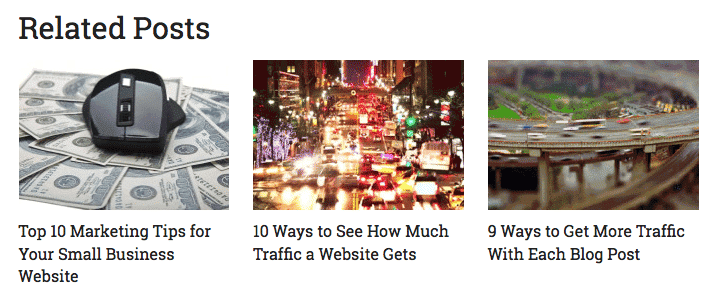
You want the kind that has the picture and then the headline under it. These kind work the best (as long as you use a good picture, of course).
The Yuzo – Related Posts plugin looks like a good one to try. People seem to like it.
Set a Daily/Weekly Routine
You want to spend time writing AND promoting. Doing just one of these won’t work – you need to spend about equal time on both. I might weight writing a little more than promoting, but not much at all – maybe 60% / 40%.
Take a typical week where you’re still working at another job and spending time with family and friends. You might just have 2-3 hours a day at the most to work on your website (for now). Let’s say you publish your article on a Wednesday morning every week (this is just “for example”).
Here’s how your week might look:
- Sunday Night: Writing article.
- Monday: Adding more content to your article and proof reading it.
- Tuesday: Finish your article with another read-through, add images and add video – then schedule it to publish Wednesday morning or publish it now.
- Wednesday: Promote the article you just wrote (HootSuite) and post comments in forums and Yahoo! Answers.
- Thursday: Promote previous articles you’ve written (HootSuite) and post comments in forums and Yahoo! Answers.
Does that look do-able?
You’ll be pumping out a great article every Wednesday and then taking 2 days (nights… whatever) to promote your content. You can take weekends off or use weekends for research and getting a head start on content.
Maybe once a month you’re also working on a guest blog post on the side. Maybe that’s your Friday project – working on that additional article and then getting one of those out each month. This sounds like a really good idea – let’s add that in:
- Friday: Work on guest post.
All you do now is just lather, rinse, repeat!
Congratulations!
And on that note, that’s the end of the 7-day portion of this course! Congrats, you did it!
By now, you should have a working website and maybe even a few articles up on it. You should be on your way to accomplishing great things. The secret here is to keep working. Don’t expect tons of traffic right away – it’ll come. Just keep going.
Start asking friends what they think of your website. If they like it, ask them to share it with others. This is a great way to get some initial traction. If they give you advice or say something about it, then think about what they said and decide if you should fix things or not. Don’t take any criticism personally… yeah, it’s something you built but it’s your first website – where is their website and did they take this course and learn a lot? No, you did.
Some More Advice:
Treat your website like a business. Track your traffic, the time you put in, how much you make each month. This planning and statistics will pay off later.
Think about who would be reading your blog. Define them as a persona. Are they are 20-30 year old housewife or a 30-40 year old man with 2 kids?
Keep track of your stats – maybe a certain article will catch on fire. That’ll tell you to write more articles like that one or beef that one up even more. You may even decide to write a small book or checklist about that topic and sell it or give it away in exchange for an email sign up to your newsletter.
 Let’s Collaborate!
 Let’s Collaborate!
What kind of website did you make? I’d love to see it and maybe we can work together. I have a lot of websites in different niches and maybe we can help each other.
I’ll even take a few minutes, look your website over and give you some pointers and compliments. Please do contact me as I love to see what my students have accomplished.
This course might be over but stay on my list because I’m going to send you even more advice and help going forward. There’s more! I want to encourage you and give you ideas on how to make your website a real success, so stay tuned!