

How do You Use the CUE Speed Sharing Tool?
The CUE Speed Sharing tool lets you quickly share pre-made banners and referral messages to social media — directly from your account dashboard. It’s designed to help you earn free service or affiliate income without needing to build anything yourself.
Just click a banner or message, choose where to share it, and your referral link is automatically attached. It’s the fastest way to get the word out about CUE.
Where to Find It
- Log in to your CUE account using your 12-digit access code
- Go to the “Speed Sharing” or “Promo Tools” section
- Browse the list of ready-made banners and messages
- Click one to instantly share to Facebook, Twitter, or other platforms
What If It’s Not Working? (There is actually a problem)
Right now (at the time of writing this article), only the first share option (top left) is working properly for most users. The other buttons may not auto-fill the referral link or preview correctly.

Here’s what happens if you’re not careful / not watching what it’s doing:
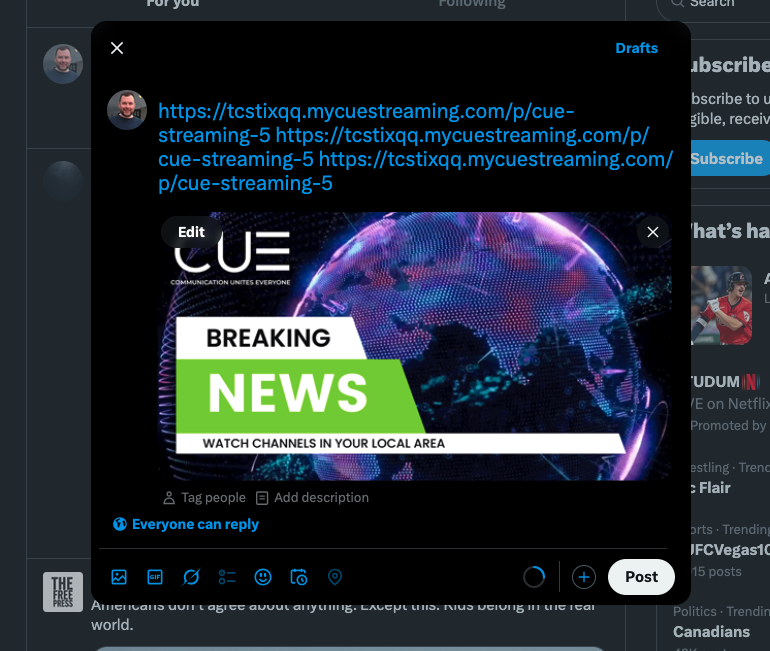
The link it’s putting in is this as the link:
https://tcstixqq.mycuestreaming.com/p/cue-streaming-5 https://tcstixqq.mycuestreaming.com/p/cue-streaming-5 https://tcstixqq.mycuestreaming.com/p/cue-streaming-5
It’s the name of the image 3 times. If I wasn’t careful, I would have posted a link to an image, not to the sign up. I don’t know if or when they will fix this. They were having meeting with affiliates, but they stopped that for some reason. It would be great to mention things like this to them more easily.
Workaround: Copy your referral link manually from your dashboard and paste it into your post. You can still use the images or suggested messages — just pair them with your custom link. The banners are good, actually – you just have to be careful.
Tips for Better Results
- Add a short personal message to make the post feel authentic
- Try different banners over time to see what gets clicks
- Use the same referral link every time — it tracks automatically
Related FAQs
Final Thoughts
The Speed Sharing tool makes it easier to spread the word about CUE — and earn while you do it. If the one-click sharing isn’t working yet, a simple copy-paste gets the job done just as well.